Skip to content

Linux Mint 19 Tara: Group Task List Windows

Linux Mint 19 Tara: Group Task List Windows published on

If you have a lot of open windows, then the task list could run out of space. The grouping of the windows is a good feature to don't loose the overview.
This is what I mean with "grouping":
grouped window

There is a good Applet called Icing Task Manager. Install steps:

  1. Open Applets via System Settings
  2. Go to Download and search and install Icing Task Manager
  3. At tab Manage activate Icing Task Manager and open its settings
  4. In tab Panel change Title display to "Title" (or "App"). Otherwise only the icon is displayed and you can't tell them apart from the panel launchers.
  5. Now you have to remove the old Window list.
    1. Right click on the taskbar, chose "Panel edit mode"
    2. Right click on the old Window list and choose "remove Window list"
  6. have fun


CAS IS-M: Modul “Zusammenarbeit mit Partnern, Outsourcing”

CAS IS-M: Modul “Zusammenarbeit mit Partnern, Outsourcing” published on

Meine Notizen zum Modul "Zusammenarbeit mit Partnern, Outsourcing". Kann evtl. auch als Gedankenauffrischer verwendet werden, bei eigenem Outsourcing-Projekt.

  • habe ich an alles gedacht?
  • mögliche kritische Punkte
  • etc.

Zusammenarbeit mit Partnern, Outsourcing

AKV mit RACI darstellen/analysieren

AKV mit RACI darstellen/analysieren published on

Mit AKV werden Aufgaben, Kompetenzen und Verantwortlichkeiten einer Person bezeichnet.
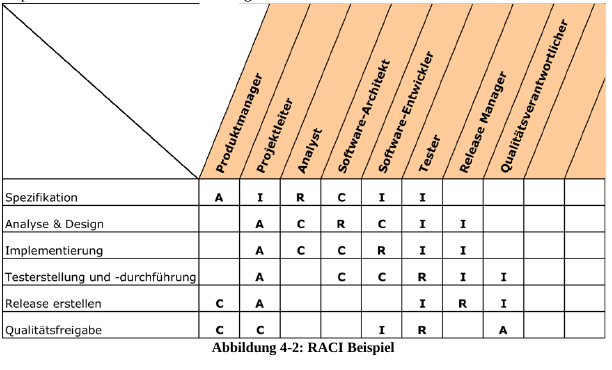
Eine Möglichkeit diese über eine Organisation zu analysieren und darzustellen ist RACI, welches für folgendes steht:

  • Responsible
  • Accountable
  • Consulted
  • Informed

Mit einer Matrix können diese gut dargestellt werden (Quelle HSLU, IS-M 2018 "Governance der Informationssicherheit", Daniel Eugster):
Bild RACI-Matrix

Information Security Governance in Law

Information Security Governance in Law published on

Kurzzusammenfassung für Prufungsvorbereitung

Was ist Corporate Governance

Als Corporate Governance bezeichnet man die Steuerung innerhalb der Organisation, mit dem Ziel das Management zu unterstützen und verbessern. Es soll die Aktionärsstellung durch Organisation- und Strukturfragen geschützt werden. Es geht um grundlegende Verhaltenspflichten im Bereich Organistation und Führung und um das grundlegende Verhältnis zwischen Geschäftsleitung und Verwaltungsrat.

Die Governance definiert Regeln, Metriken, Prozess und organisatorische Strukturen um eine effektive Planung und Steuerung sicherzustellen.

Das "Governance Model" liefert Antworten zu fragen wie:

  • Was wird getan?
  • Wie wird es getan?
  • Wer ist verantwortlich?
  • Wie soll gemessen werden?

Wie ist Corporate Governance in der Schweiz geregelt?

Die Corporate Governance ist durch das Schweizerische Aktienrecht geregelt. In der Praxis gibt es umfassende Corprate-Governance-Leitlinien (siehe Selbstregulierungswerke "Swiss Code of Best Practice for Corporate Governance" und "SIX-Richtlinie der Schweizer Börse")

Weiter gibt es die Grundsätze der OECD und das US Gesetz "Sarbanes Oxley Act (SOX)" aus dem Jahre 2002. Der SOX verlangt die genaue Nachvollziehbarkeit und eindeutige Zuordnung unternehmerischer Handlungen von Personen.

Selbstregulierungen wie ISO9001 und Good Priv@cy sind für die Corporate Governance von Bedeutung.

Rolle der Gremien

Oberstes Organ ist die Generalversammlung. Ihr sind die wichtigsten Kompetenzen unübertragbar zugeordnet (Art. 698 ff OR). Sie muss alljährlich innerhalb von 6 Monaten nach Jahresabschluss stattfinden. Grundsätzlich gilt absolutes Mehr, bei wichtigen Beschlüssen qualifizierte Mehrheit. Die GV wählt den Verwaltungsrat.

Der Verwaltungsrat fällt Beschlüsse, die nicht in den Bereich der Generalversammlung fallen. Ihm obliegt die Oberleitung und Oberaufsicht der AG. Weitere Aufgaben sind:

  • Festlegung der Organisation
  • Planung
  • Personelle Entscheide
  • Rapportierung an die Aktionäre
  • Benachrichtigung des Richters bei Überschuldung

Der Verwaltungsrat ist verantwortlich für die professionelle, strategische Führung und überwacht die operative Geschäftsleitung. Er muss ein Internes Kontrollsystem (IKS) betreiben und führt Risikobeurteilungen durch. Die Revisionsstelle überprüft das Vorhandensein eines IKS.

Das Gesetz schreibt in Art. 727 ff. OR die Revisionsstelle als spezielles Kontrollorgan vor, da die Kontrollrechte des Aktionärs eingeschränkt sind. Es gibt die ordentliche und eingeschränkte Revision. Gem. Art. 727 OR sind folgende Organisationen zur ordentlichen Revision verpflichtet:

Gesellschaften, die zwei der nachstehenden Grössen in zwei aufeinander folgenden Geschäftsjahren überschreiten:
a. Bilanzsumme von 20 Millionen Franken,
b. Umsatzerlös von 40 Millionen Franken
c. 250 Vollzeitstellen im Jahresdurchschnitt;

Der Swiss Code of Best Practice sieht im Entwurf von 2014 verschidene Commitees vor, welche Ausschüsse des VR sind:

  • Audit Committee (siehe nachfolgende Folie)
  • Compensation Committee
  • Nomination Committee

Das Audit Committee ist der Prüfungsausschuss des Verwaltungsrates und setzt sich vertieft mit Finanz- und Rechnungswesen auseinander. Es besteht aus nicht exekutiven Mitgliedern des VR.

Das Advisory Board hat beratende und empfehlende Funktion und wenig Entscheidungsbefugnisse.

Run Apache on Windows as Reverse Proxy for Tomcat

Run Apache on Windows as Reverse Proxy for Tomcat published on

Steps

  1. Make sure, in %TOMCATHOME%\conf\server.xml the connector is running on 8080 for http and 8443 for https, and the default 8009 on AJP
  2. Download Apache from http://www.apachelounge.com/download/ or use the ZIP from the screenFOOD server deployment artifcats
  3. Install "C++ Redistributable Visual Studio 2017" provided in the deployment artifacts "VC_redist.x64.exe"
  4. Unzip Apache to c:\opt\Apache24
  5. Copy httpd.conf and reverseproxy.conf to C:\opt\Apache24\conf. Make sure, Include conf/reverseproxy.conf is set properly in httpd.conf
  6. make sure in httpd.conf the SRVROOT is correct according to the install folder
      Define SRVROOT "C:/opt/Apache24/
    
  7. Open CMD and CD to C:\opt\Apache24\bin and run httpd.exe.
    • if it starts, install the service with
      httpd.exe -k install
      
    • if it does not start, some usefull errors are printed. Perhaps you have to activate/deactivate some module

  8. Go to services.msc and start "Apache2"

https with free Let’s Encrypt certificate

https with free Let’s Encrypt certificate published on

This how to was created, before wildcard certificates were possible.

Steps:

  1. Install lets encrypt
  2. Get a certificate
  3. Add the certificate path to apache config

Get a certificate with certbot

Let's encrypt recommends cretbot to create and renew a certificate. For openSUSE we can follow the steps from https://certbot.eff.org/#pip-other, below the steps summarized:

wget https://dl.eff.org/certbot-auto
chmod a+x /opt/certbot-auto
/opt/certbot-auto certonly -d <SUBDOMAIN>.example.com --webroot -w /opt/tomcat/webapps/ROOT/

You could add multiple domain names with -d .example.com if needed.

After that, the certificates are stored at /etc/letsencrypt/live/.example.com . Now change in the SSL configuration of /etc/apache2/conf.d/example.com this two lines and reload apache2:

SSLCertificateKeyFile /etc/letsencrypt/live/<SUBDOMAIN>.example.com/privkey.pem
SSLCertificateFile /etc/letsencrypt/live/<SUBDOMAIN>.example.com/fullchain.pem

Automatically renew the certificate

It is recommended to run the renew script daily (see https://serverfault.com/... ). The certificate actually is renewed, if the expire date is < than 30 days. A let's encrypt certificate by default is valid 90 days.

Add a cronjob with crontab -e and add following line:

45 00 * * * /opt/certbot-auto renew --no-self-upgrade --post-hook "systemctl reload apache2"

This will run certbot-auto daily and with "post-hook" apache2 is reloaded, if the certificate is renewed.
Create certs for Apache reverse proxy

Certbot has a plugin, to automatically create a certificate for all subdomains. To create the certificat run:

/opt/certbot-auto --apache

The script will ask you, to select the domains, choose all then a certificate is generated and a https config for every subdomain.

If you add a new subdomain you then the certificate could be renewed with the new subdomain included with this command:

/opt/certbot-auto certonly --apache --expand
systemctl restart apache2.service

Windows server with Apache

Install according to https://github.com/Lone-Coder/letsencrypt-win-simple.
Steps are first downloading and extracting, then run letsencrypt.exe from command line:

letsencrypt.exe --plugin manual --manualhost indowsserver.example.com --webroot C:\apache2\htdocs

Certificates are stored at:

  • Key: "C:/programdata/letsencrypt-win-simple/httpsacme-v01.api.letsencrypt.org/windowsserver.example.com-key.pem"
  • Cert: "C:/programdata/letsencrypt-win-simple/httpsacme-v01.api.letsencrypt.org/windowsserver.example.com-chain.pem"

This both certificate have to be configured in "C:\Apache24\conf\example.conf"
Task Scheduler has a renewing job which runs daily